1、参考sqli-lab靶场优化第一周编写的cms,将注册功能,登录功能优化,新增修改密码功能
注册优化
<?php
header('Content-Type: text/html; charset=utf-8');
$db_host = '127.0.0.1';
$db_admin = 'root';
$db_passwd = 'root';
$db_name = 'cms';
$link = mysqli_connect($db_host, $db_admin, $db_passwd, $db_name);
$post_id = isset($_POST['account']) ? (int)$_POST['account'] : 0;
$post_user = isset($_POST['name']) ? mysqli_real_escape_string($link, $_POST['name']) : '';
$post_passwd = isset($_POST['password']) ? mysqli_real_escape_string($link, $_POST['password']) : '';
if ($post_id == null || $post_user == null || $post_passwd == null) {
exit('请勿输入空数据');
}
$select_id = 'SELECT * FROM USER WHERE id = ' . $post_id;
$result1 = mysqli_query($link, $select_id);
$row_count = mysqli_num_rows($result1);
if ($row_count === 1) {
exit('账号id重复,请返回重新注册!');
}
$stmt = mysqli_prepare($link, "INSERT INTO user (id, username, password) VALUES (?, ?, ?)");
mysqli_stmt_bind_param($stmt, "iss", $post_id, $post_user, $post_passwd);
if (mysqli_stmt_execute($stmt)) {
mysqli_close($link);
header("Location: success.html");
exit;
} else {
echo "注册失败: " . mysqli_error($link);
}
?>
|
登录优化
<?php
header('Content-Type: text/html; charset=utf-8');

$db_host = '127.0.0.1';
$db_admin = 'root';
$db_passwd = 'root';
$db_name = 'cms';

$link = mysqli_connect($db_host, $db_admin, $db_passwd, $db_name);
$post_id = $_POST['name'];
$post_passwd = $_POST['password'];

if ($post_id == null || $post_passwd == null) {
	exit('请勿输入空数据');
}

$select_t = "SELECT * FROM USER WHERE username = '$post_id' ";
$result1 = mysqli_query($link, $select_t);
$row_count = mysqli_num_rows($result1);
if ($row_count === 0) {
    exit('账号不存在,请返回注册!');
}

$select_id = "SELECT * FROM USER WHERE username = '$post_id' ";
$result = mysqli_query($link, $select_id);
if ($result) {
	$row_assoc = mysqli_fetch_array($result, MYSQLI_ASSOC);
	if ($post_passwd == $row_assoc['password']) {
		mysqli_close($link);
		header("Location: user.html");
	} else {
		exit('账号或密码错误');
	}
} else {
	exit('账号或密码错误');
}
?>
|
密码修改功能
<?php
header('Content-Type: text/html; charset=utf-8');

$db_host = '127.0.0.1';
$db_admin = 'root';
$db_passwd = 'root';
$db_name = 'cms';

$link = mysqli_connect($db_host, $db_admin, $db_passwd, $db_name);
$post_user = $_POST['name'];
$post_passwd_old = $_POST['password_old'];
$post_passwd = $_POST['password'];

if ($post_user == null || $post_passwd == null || $post_passwd_old == null) {
	exit('请勿输入空数据');
}

$select_t = "SELECT * FROM USER WHERE username = '$post_user' ";
$result1 = mysqli_query($link, $select_t);
$row_count = mysqli_num_rows($result1);
if ($row_count === 0) {
    exit('请输入正确账号!');
}

$select_id = "SELECT * FROM USER WHERE username = '$post_user' ";
$update_passwd = "UPDATE user SET PASSWORD='$post_passwd' where username='$post_user' and password='$post_passwd_old' ";
$result = mysqli_query($link, $select_id);
if ($result) {
	$row_assoc = mysqli_fetch_array($result, MYSQLI_ASSOC);
	if ($post_passwd_old == $row_assoc['password']) {
		mysqli_query($link, $update_passwd);
		mysqli_close($link);
		header("Location: index.html");
	} else {
		exit('账号或密码错误');
	}
} else {
	exit('账号或密码错误');
}

?>
|
2、修复sqli-lab靶场的宽字节注入、万能密码、二次注入、堆叠注入
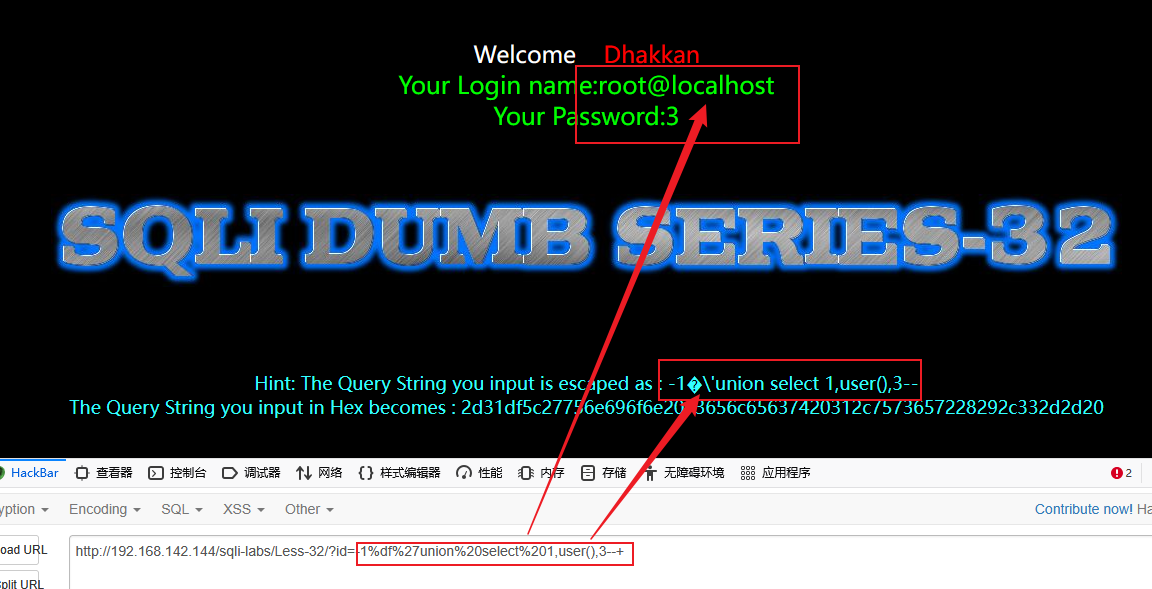
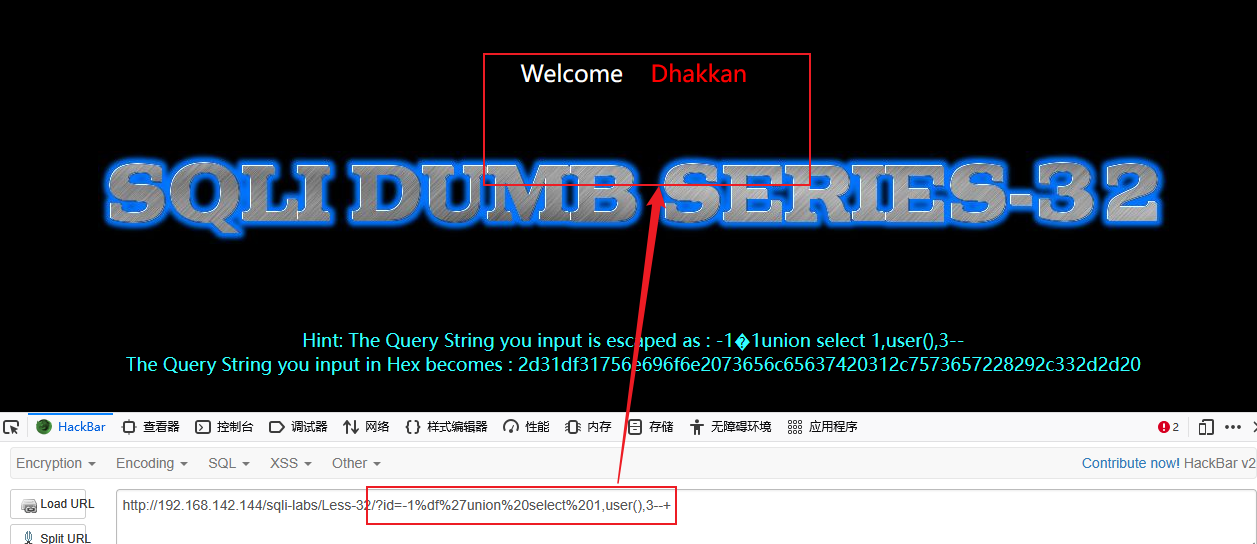
宽字节注入
发现单引号'替换为数字1,双引号"替换为数字2
function check_addslashes($string)
{
$string = preg_replace('/'. preg_quote('\\') .'/', "\\\\\\", $string);
$string = preg_replace('/\'/i', '1', $string);
$string = preg_replace('/\"/', "2", $string);
return $string;
}
|
修改前
修改后
二次注入
function check_addslashes($string)
{
$string = preg_replace('/'. preg_quote('\\') .'/', "\\\\\\", $string);
$string = preg_replace('/\'/i', '1', $string);
$string = preg_replace('/\"/', "2", $string);
$string = preg_replace('/\#/', "3", $string);
$string = preg_replace('/\-/', "4", $string);
$string = preg_replace('/\+/', "5", $string);
return $string;
}
|
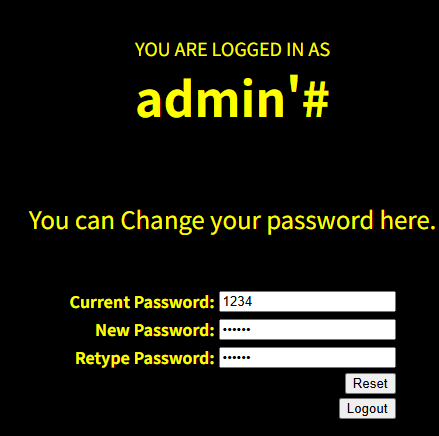
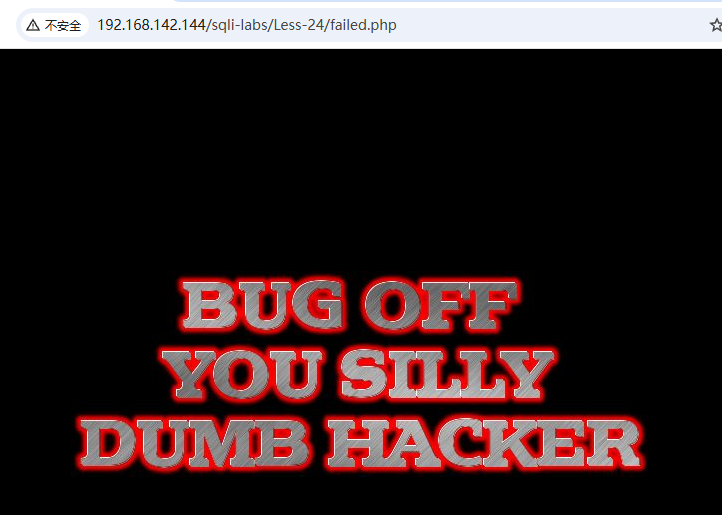
尝试修改密码
修改失败
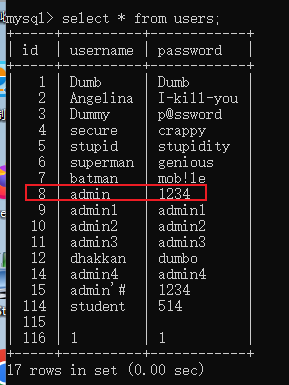
返回数据库查看密码没有变化
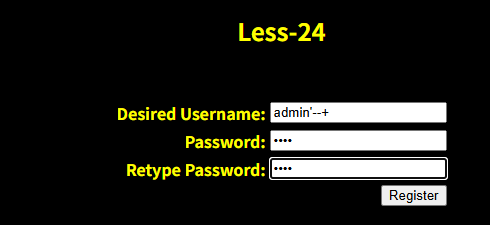
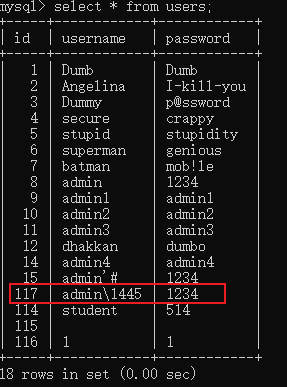
注册新用户 admin’–+
返回数据库查看新用户,输入的特殊字符被转义了不会造成二次注入
堆叠注入
方法一
mysqli_multi_query
mysqli_query
function check_addslashes($string)
{
$string = preg_replace('/'. preg_quote('\\') .'/', "\\\\\\", $string);
$string = preg_replace('/\'/i', '1', $string);
$string = preg_replace('/\"/', "2", $string);
$string = preg_replace('/\#/', "3", $string);
$string = preg_replace('/\-/', "4", $string);
$string = preg_replace('/\+/', "5", $string);
return $string;
}
|
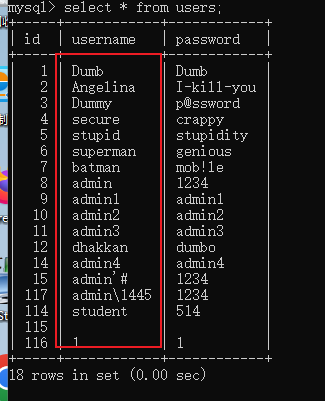
尝试堆叠注入
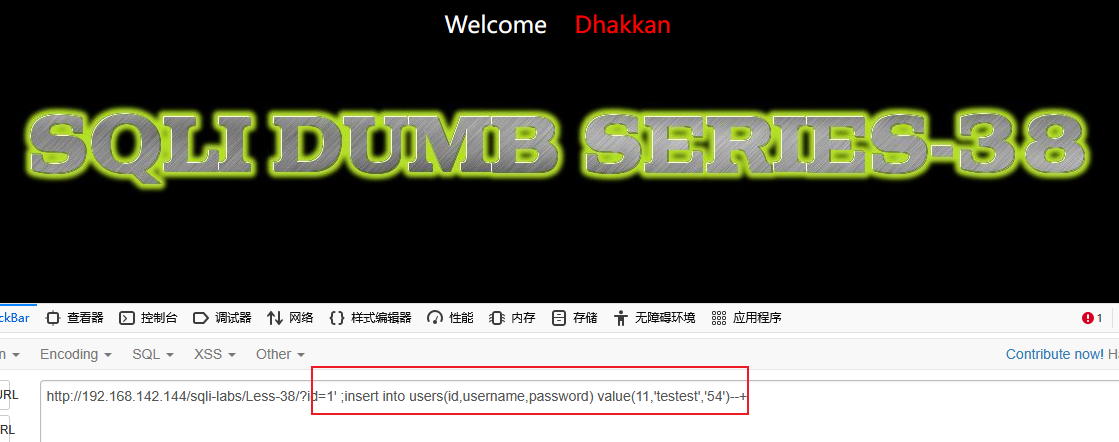
数据库没有新增 testest 用户
方法二
使用参数化查询
$sql = "SELECT * FROM users WHERE id = ? LIMIT 0,1";
$stmt = mysqli_prepare($con1, $sql);
if ($stmt) {
mysqli_stmt_bind_param($stmt, "s", $id);
if (mysqli_stmt_execute($stmt)) {
$result = mysqli_stmt_get_result($stmt);
if ($row = mysqli_fetch_assoc($result)) {
echo '<font size="5" color="#00FF00">';
printf("Your Username is : %s", htmlspecialchars($row['username']));
echo "<br>";
printf("Your Password is : %s", htmlspecialchars($row['password']));
echo "<br>";
echo "</font>";
} else {
echo "未找到用户";
}
mysqli_free_result($result);
} else {
echo "查询执行失败";
}
mysqli_stmt_close($stmt);
}
|
万能密码
function check_addslashes($string)
{
$string = preg_replace('/'. preg_quote('\\') .'/', "\\\\\\", $string);
$string = preg_replace('/\'/i', '1', $string);
$string = preg_replace('/\"/', "2", $string);
$string = preg_replace('/\#/', "3", $string);
$string = preg_replace('/\-/', "4", $string);
$string = preg_replace('/\+/', "5", $string);
return $string;
}
$uname=check_addslashes($_POST['uname']);
$passwd=check_addslashes($_POST['passwd']);
|
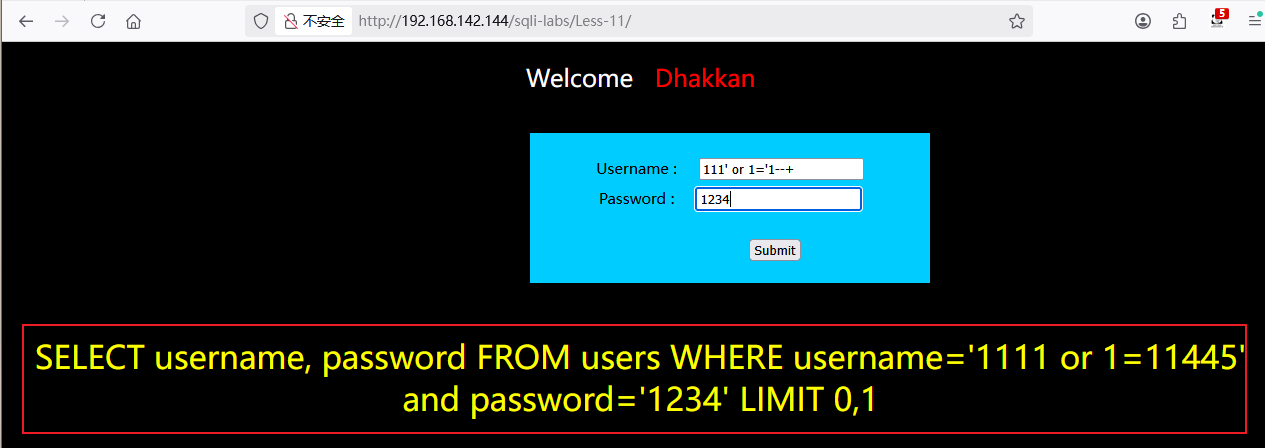
结果测试,没有显示登陆成功的用户。显示的是自行添加输出的查询语句
3、尝试挖掘自己cms网页的sql注入漏洞,编写渗透测试报告并修复漏洞
4、针对testfire.net网页进行渗透测试,编写渗透测试报告,全流程
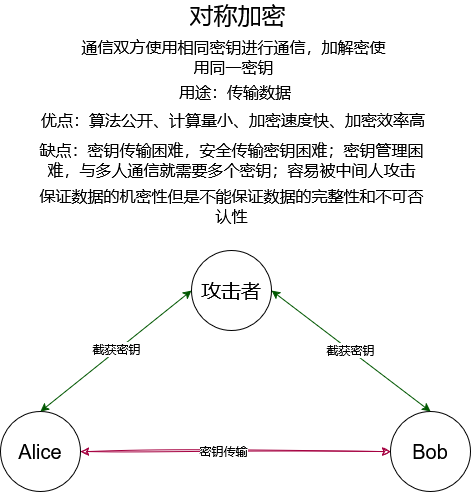
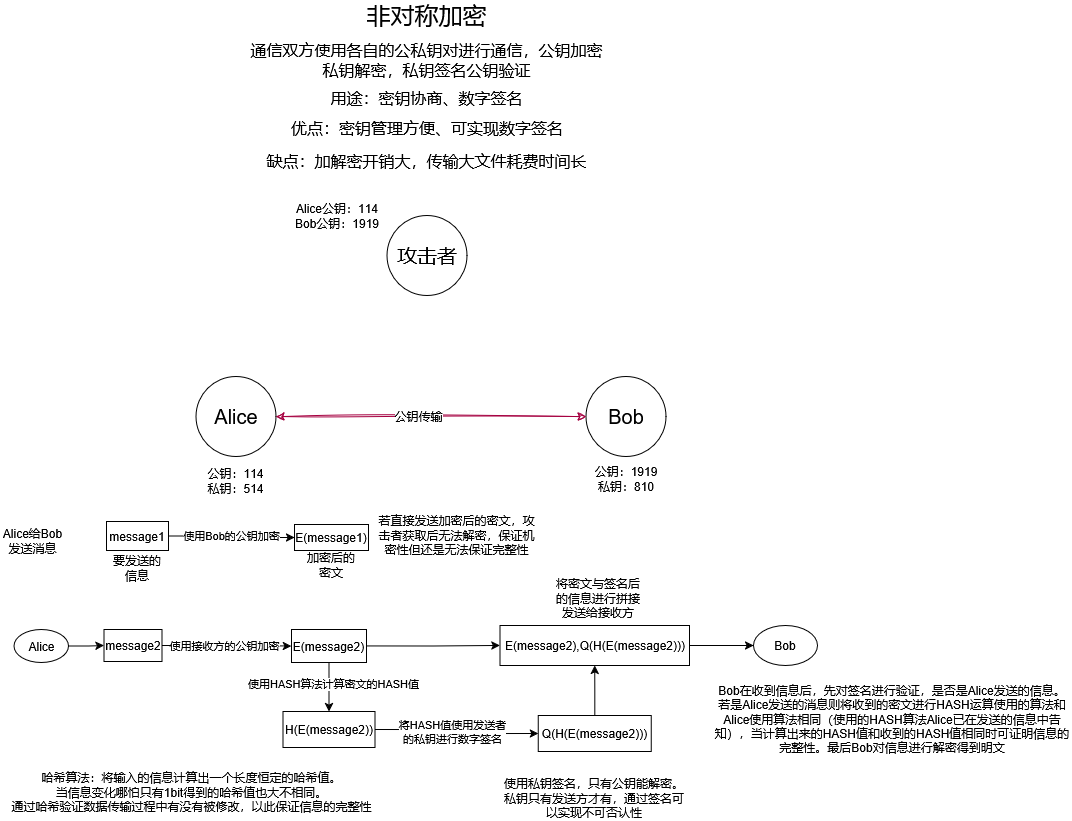
5、画图描述对称加密与非对称加密的流程